Friday, February 22, 2019

How To setup global settings and use in methods or vue file in NUXTJS

Let say you want to setup a json file were all static settings are saved. you want to use dierctly either in codes or in view pages across the application.

Here is the steps.

1.  Create a file setting.json in root directory (where your project exists)
        your settings will be like this -

2.  Create another file "settings.js" in middleware folder
3.  paste this code inside setting.js file

4. open your nuxt.config.js and find router-middleware. if not then paste this code

That's it.

Now See how to use

in code (E.g in create or inside method)

created(){
  var a =  $s.key
}

and in .vue page

{{ $s.key}} or {{ $s['key']}}


Tuesday, June 19, 2018

[Fixed] How to install Memcache in XAMPP, on window 10 successfully

[Fixed] How to install Memcache in XAMPP, on window 10 successfully


Note- after days investing in debugging and research, finally I found that why my installation was not success.

If you are facing these kind of issue-
1.       Fatal error: Class 'Memcache' not found (or) Fatal error: Call to undefined function memcache_connect()
2.       PHP Warning:  PHP StartupUnable to load dynamic library 'php_memcache.dll' (tried: C:\xampp\php\ext\php_memcache.dll (%1 is not a valid Win32 application.)       
3. Or simply you are new to memcache then follow one by step.


Follow these steps- 

1.   Run phpinfo() in your XAMPP.
2.   See, Compiler and Architecture.


    Now search TS, or NTS, you will get one atlist. In my case I found 
    Zend Extension Build = API320170718,TS,VC15

    This mean, We need Memcache of VC15 32 bit and TS (thread safe version).
    (if a package is NTS then it will mention explicitly otherwise not)

    Now once you find your right file name, go here and download-


Go to ext folder and copy php_memcache.dll and php_memcache.pdb 
Restart the server and refresh phpinfo() page.

Now Search Memcache. If you can see a block, then you have won the battle.


Copy the sample code from this link- https://github.com/sudhir600/php-memcache-testing-script
Create a php page called test.php and paste code.
navigate test.php. If you don’t see any error that mean your installation process has been completed successfully and go rock.

Monday, April 16, 2018

set virtual host (custom domain) in Nuxt / VueJs template

Hi,
if you are using Nuxt framework and your build url is something like
127.0.0.1/project:3000 or any port  but you want to access through domain like comedymood.com

Then you are in right place.

Follow this steps.

1. Open package.json file 
add this entry.

"config": {
    "nuxt": {
      "host": "0.0.0.0",
  "port": "80"
    }
  }

2. Open HOST file (file:///C:/Windows/System32/drivers/etc/hosts)
add this entry at bottom.


127.0.0.1 comedymood.com

now terminate npm process if running (ctrl+c) and then run again by "npm run dev"
you will get the url like localhost:80


But don't worry.
you open comedymood.com in your favourite browser.   
Thanks.


Wednesday, April 11, 2018

xampp - localhost is working but not 127.0.0.1 in windows

Open C:\xampp\apache\conf\extra\httpd-vhosts.conf

search <VirtualHost *:80> or this line (DocumentRoot "c:/xampp/htdocs/)
replace this with below code.

<VirtualHost 127.0.0.1:80>
DocumentRoot "c:/xampp/htdocs/"
ServerName localhost
<Directory c:/xampp/htdocs/>
Require all granted 
</Directory>
</VirtualHost>

Now Restart xampp and access 127.0.0.1


http://localhost works but 127.0.0.1 does not work in windows 
localhost - Virtual host installation not working
Unable to resolve localhost, 127.0.0.1 or local IP address ...
Localhost working but IP address and 127.0.0.1 but working


127.0.0.1 not working windows 10,  127.0.0.1 not working,  localhost working but ip address not working,  localhost not working,  127.0 0.1 not found, 127.0.0.1 localhost,  localhost not working in windows 7, 127.0 0.1 this site cant be reached

Friday, November 10, 2017

How to get a given year is a leap year using PHP or Excel/Spreadsheet

Year 1600 was leap year but not 1700.
How to solve this output using php (solution for excel/Spreadsheet is in bottom of the page).

Here is the code.

<?php
$year = 2020;
$dBy4 = gmp_div_r($year, 4);
$answer = 'Not a Leap year';
if($dBy4 == 0) {
    $dBy100 = gmp_div_r($year, 100);
    $dBy400 = gmp_div_r($year, 400);
    if($dBy100 == 0 && $dBy400 == 0) {
        $answer = $year.' is a leap year';
    }
}
// $dBy4 = gmp_div_r($year, 4);
echo $answer;

?>

Try out this Fiddle 

Also here is the solution for EXCEL 
Download excel/ spreadsheet

Monday, October 23, 2017

CallBack in JavaScript. (Simple javascript function with callback)

function abc(option, callback){
if (option == 1) {
  callback         // no () here
  }
}

function test (){
abc(1, hello())
}
function hello(){
alert('this is hello fnc used as callback');
}
test(); // Finally call here

Saturday, October 14, 2017

Remove version string (.css?v=2.0.1) from any css and javascript url in wordPress

Here is the code


// Remove query string  from static files

function removeJsCssVersionString( $src ) {
 if( strpos( $src, '?ver=' ) )
 $src = remove_query_arg( 'ver', $src );
 return $src;
}
add_filter( 'style_loader_src', 'removeJsCssVersionString', 10, 2 );
add_filter( 'script_loader_src', 'removeJsCssVersionString', 10, 2 );

Sunday, October 1, 2017

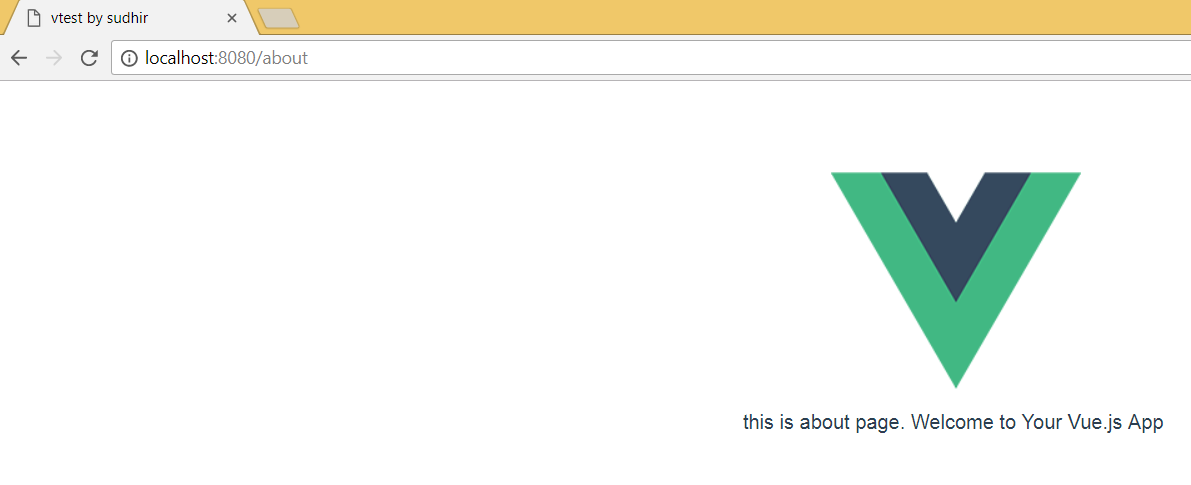
[ VueJs Solutions ] - How to remove # in url (Vue 2.0) ?

Problem -  http://localhost:8080/about#/


You want solution like this


Step to solve this issue-
 1. Open YourProjectDirectory/src/router/index.js
2.  place this code below above routes: [
      mode: 'history',

sample code- 

Vue.use(Router)

export default new Router({
  mode: 'history',
  routes: [
    {
      path: '/#',
      name: 'Hello',
      component: Hello
    },
    {
      path: '/about',
      name: 'about',
      component: about
    }
  ]

})


Thursday, April 20, 2017

How to clone IIS apppool and all website for another machine using command line

If you are working in IIS server. you have many websites listed under INSUPLTDVSG.
Suddenly you want same site setting on another laptop.

What you we do...
manual work.... no no...no...

Let me give you a quick solution.


Follow these step.

Step 1.  (Perform on the main machine)

1st you have to take backup of all settings such as apppool and websites.

Open Command Prompt and run this command

%windir%\system32\inetsrv\appcmd list apppool /config /xml > d:\apppools.xml
%windir%\system32\inetsrv\appcmd list site /config /xml > d:\websites.xml

---------------------------------
In D:/ drive, you will get two file. catch this file and sent it to another machine.


Step 2 ( (Perform on the another machine)

Now it's time to import all data so run this command

%windir%\system32\inetsrv\appcmd add apppool /in < d:\apppools.xml
%windir%\system32\inetsrv\appcmd add site /in < d:\websites.xml

----------------------------

Now if your site https:// then you have to make self-sign-certificate. you have to make a certificate,.. once done then bind it with your site.

So, How will do that.

Let's run this command

appcmd set site /site.name:"myapp.com" /+bindings.[protocol='https',bindingInformation='*:443:myapp.com']

run this command as many time as your have sites.

-----------------------------------------------------------------

I am hoping that this article will help you. However, if you got stuck and need additional help, please write a comment below.


How to send ANSI corrector in mail subject using mail function in PHP

Let's say your subject is - "Cómo estás" (that mean - cómo estás )
if you will send this subject then it will not show properly in an email.

So how to solve this issue-:

$subject = "cómo estás";
mail($to, '=?utf-8?B?'.base64_encode($subject).'?=', $body, $headers);

------------
if this code doesn't work for you then le tme know. I Have another solution too. :-)

Sunday, January 29, 2017

[Resolved] How to cancel all sent friendship request on Facebook at one click

Cancel all pending Friendship Request in 30 second. Just in one click.

Step-: 01 Click on Below Link

 https://m.facebook.com/friends/center/requests/outgoing/#friends_center_main 


Step -: 02  Right click on page and select inspect


Step -: 03  Paste below code in console and then hit enter. (wait few second to complete the request)


javascript:var inputs = document.getElementsByClassName('_54k8 _56bs _56bt'); for(var i=0; i<inputs.length;i++) { inputs[i].click(); }


Friday, October 28, 2016

How to find how many parameter / Arguments has been passed and there value

code-
<?php
    function parentFunction($name='name') {
        echo "There are total: ".func_num_args()." Arguments passed.<BR>";
        $args = func_get_args();

echo '<pre>';
print_r($args);
echo '</pre>';

//fetch the value
        for($i = 0; $i < count($args); $i++) {
echo "Passed Value: {$args[$i]}<br />";
        }
      }
    parentFunction($name= 'name','email','phone','location');
?>

login authentcation via browser prompt using PHP


<?php
if (($_SERVER['PHP_AUTH_USER'] != 'a') || ($_SERVER['PHP_AUTH_PW'] != 'a')) {
      header('WWW-Authenticate: Basic Realm="Secret Stash"');
      header('HTTP/1.0 401 Unauthorized');
      print('You must provide the proper credentials!');
      exit;
   }
else{
echo 'login done';
//do stuff here
}
?>

Extract Only numbrs from long string using Regex with PHP (Regular Expressions)

Here is a string -: RT4646R@TWBNSN3234FHFHFH893892389FHDJJD$

Now How will find all red marked numbers in an Array.Here is solution.


<?php
$string = 'RT4646R@TWBNSN3234FHFHFH893892389FHDJJD$';
$special_char = '\[#$%^&*()+=\-\[\]\';,.\/{}|":<>?~\\\\]';
preg_match_all('/\d+/', $string,$output);

echo '<pre>';
print_r($output[0]);
?>


Here is the output

PHP Regular Expressions


Author - 
sudhir k gupta | sudhir gupta | sudhir kumar gupta | eghara
Sudhir K gupta | Lonawala

Tuesday, September 27, 2016

Convert All Table TD data into Titlecase with 1 line of code

Lets say.. you receive input from server and that input is unstructured. No proper title case. 


Just like this. 


And You want like this (in just one click or unload )


Here is the code (Copy link is below the screenshot)


Download Full Code From Here

Tuesday, September 20, 2016

How to check a value exists in javascript array

Lets say user send a input "abcd" or "123". Now i want to check that incoming input should be  valid as assign in javascript array.

Like this -:


And you want output like this


var validFormatsArray = ['varchar','email','int','phone','sudhir'];
var isValidFormat = $.inArray('int'.toLowerCase(), validFormatsArray);

if(isValidFormat == -1){
  alert('Invalid format detected');
}else{
  alert('valid format');
}

Checkout this video tutorial


Also Read-:

Top most 15 haunted places in india which will dread your body


Sunday, September 18, 2016

How to translate one word to all possible language in single click

This trick will work in google spreadsheets only.


1) open a blank (new) google docs spreadsheet
2) add this to cell B2:
=GoogleTranslate($A$1, "en", "af")
3) Copy the formula entered into B2 to as many rows you want, one for each language.
4) replace the "af" (afrikaans) with whatever language codes you want in the formulas below B2 ... google has 149 languages to pick from. See here: Google Language Codes - tomihasa
5) Enter the stuff you want translated into cell A1


Saturday, September 17, 2016

How to use google voice in chrome (awesome tricks)

1. How do you turn on voice search on Google Chrome?
2. What is the Voice Search?
3. How do I use voice commands?


must watch and learn how to use effectively google voice in your computer using chrome